
OpenClaw: Beyond Endpoints
Beyond Endpoint Detection, Think Identity Security
Background
Of late, there has been a lot of buzz around OpenClaw (formerly Clawdbot or Moltbot), and its game-changing use cases and advantages. Yet, one cannot disregard the security-related issues they bring along. From what OpenClaw can do in terms of capabilities to where and how it stores credentials have been points of discussion for security professionals.
This is sure to fuel a lot of infostealers, who will find it even easier to steal credentials like client secrets and tokens. All they have to do is land on the endpoint. The credentials configured on OpenClaw are then handed on a silver platter, with the known locations being: ~/.openclaw/credentials/, ~/.openclaw/openclaw.json, environment variables, or client-specific configuration directories.
Another feature of OpenClaw that adds to the security issue is the ability for users to expose it to the internet, allowing users to access all their apps conveniently from anywhere.
On the other hand, the OpenClaw skills, bundled or community-developed, cannot be trusted because they are not developed with the principle of least privileges in mind. The skills, especially the community-developed ones, can even be malicious. It has also been proven that reputation metrics such as stars and installation counts are not trustworthy when choosing options for integration.
Though there have been several recommendations on how to detect whether someone is using OpenClaw in an enterprise, most have centered on requiring an endpoint detection and response (EDR) product. This blog takes a different, more reliable approach to detect if there is OpenClaw usage by any users in an organization. Whether they are doing it from their corporate machine (with an EDR agent) or from unmanaged machines, an identity security approach can detect it. While OpenClaw presents a significant risk, it is part of a broader category of identity threats. Let’s explore in-depth the intersection of OpenClaw and enterprise identity.
Endpoint Based Detection Model
Enterprises that have rolled out EDR solutions have a way to detect potential open-claw usage. In the most ideal case, this is a decent way of detecting if anyone in the enterprise has installed OpenClaw and is using it. This approach has certain deficiencies, though. Here is a non-exhaustive list:
- Users using OpenClaw from a personal device
- Users using OpenClaw from a remote device within an enterprise that doesn't have EDR Agent installed
- A smart user renaming every occurrence of the string OpenClaw using a simple coding agent and running it on a corporate device that has an EDR agent installed.
OpenClaw's functionality requires access to enterprise tools, applications, and data, and this is where it leaves identity breadcrumbs. Every meaningful OpenClaw interaction eventually touches enterprise identity systems: OAuth grants, API tokens, service principals, bots, or direct API calls. The scenarios in which OpenClaw shares tokens or credentials with an interactive user are where behavioral analysis is especially valuable, enabling far more reliable detections.
From an enterprise perspective, relying solely on endpoint detection is optional at best and certainly not a guaranteed path to detection.
Identity-based Detection Model
Instead of asking whether any users have OpenClaw installed, the detection approach should focus on identifying the identity artifacts and behaviors associated with its use.
We will be focusing on a few popular enterprise applications (Slack, Google Workspace, Microsoft Outlook) and giving details around the identity breadcrumbs that OpenClaw usage leaves.
Slack
A Slack channel is enabled for OpenClaw through a Slack app (bot) installation. Enterprises can control the installation of such apps by having the right settings at the organization level and also at the workspace level in Slack.
Enterprises that do not control app installations in Slack can look for apps installed after the day OpenClaw became widely popular (~25th Jan 2026) and for apps with any of the scopes in the group below.
Group 1:
"App_mentions:read", "channels:history", "channels:read", "chat:write", "commands", "emoji:read", "files:read", "files:write", "groups:history", "groups:read", "groups:write", "im:history", "im:read", "im:write", "mpim:history", "mpim:read", "mpim:write", "pins:read", "pins:write", "reactions:read", "reactions:write", "search:read", "users:read"
Group 2:
"App_mentions:read", "channels:history", "channels:read", "chat:write", "commands", "emoji:read", "files:read", "files:write", "groups:history", "groups:read", "im:history", "im:read", "mpim:history", "mpim:read", "pins:read", "pins:write", "reactions:read", "reactions:write", "search:read", "users:read"
Group 3:
"Chat:write", "channels:history", "channels:read", "groups:history", "im:history", "mpim:history", "users:read", "app_mentions:read", "reactions:read", "reactions:write", "pins:read", "pins:write", "emoji:read", "commands", "files:read", "files:write"
In addition to the Scopes, check for audit log activities with user agents corresponding to native operating system tools like curl and wget, which OpenClaw uses. Note that user-agent signals are weak indicators and must be combined with context.
Google Workspace
The Google Workspace integration is enabled through the bundled gogcli skill, which requires a custom OAuth client to be registered in Google Cloud Platform (GCP). The access is then authorized through the user-provided consent.
Similar to Slack, enterprises can control which apps can access Google Workspace data from here.
Enterprises that do not have any such restrictions can check for OAuth clients on GCP that were registered after 25th Jan 2026, with the following scopes:
"https://www.googleapis.com/auth/documents", "https://www.googleapis.com/auth/chat.memberships", "https://www.googleapis.com/auth/contacts", "https://www.googleapis.com/auth/userinfo.email", "https://www.googleapis.com/auth/spreadsheets", "https://www.googleapis.com/auth/chat.spaces", "https://www.googleapis.com/auth/drive", "https://www.googleapis.com/auth/contacts.other.readonly", "https://www.googleapis.com/auth/gmail.settings.basic", "https://www.googleapis.com/auth/chat.users.readstate.readonly", "https://www.googleapis.com/auth/gmail.settings.sharing", "https://www.googleapis.com/auth/directory.readonly", "https://www.googleapis.com/auth/chat.messages", "https://www.googleapis.com/auth/userinfo.profile", "https://www.googleapis.com/auth/calendar", "https://www.googleapis.com/auth/gmail.modify",
"https://www.googleapis.com/auth/tasks"
Also, check the OAuth log events for any user "Grant" events with the same scope and the corresponding OAuth client. For such OAuth clients, check for activities with the "API Call" events.
The combination of the OAuth scopes, user grants, and the activities provides a strong indication of whether OpenClaw is in use.
Microsoft Outlook
There are several ways of providing Outlook access to OpenClaw. Here, we would focus on one of the ways: using App Registrations. Note that app registrations can be blocked in Microsoft using the settings described in this article.
One way to detect OpenClaw usage is to monitor the app registrations and look for specific scopes granted to these apps. These apps are very likely configured with the Reply URL or redirect URL pointing to localhost.
Combining new app installations after the OpenClaw launch with a specific set of scopes and a redirect or reply URL pointing to localhost definitely indicates that the app registration was done for OpenClaw. Also, note that this app will be marked as an ‘Unverified Publisher.’
The scopes for such Apps would be:
"Mail.ReadWrite", "Mail.Send", "Calendars.ReadWrite", "offline_access"
If you are monitoring the Microsoft Entra logs, monitoring the following log sources would help: Audit logs, Interactive Sign-in Logs, Non-interactive Sign-in Logs, Graph Activity Logs, Exchange Online Audit Logs.
In any of the Enterprise applications that use OAuth apps to connect a skill with OpenClaw, this blog highlights how to detect anomalies in OAuth app usage.
GitHub
The GitHub skill for OpenClaw uses the official GitHub CLI. A human user (aka human identity) can just configure the GitHub CLI to use their GitHub account and start using it through OpenClaw (a non-human identity).
The OAuth scopes default to those requested by GitHub CLI:
"gist", "read:org", "repo", "workflow"
Even the user agents in the logs reflect that of GitHub CLI and/or git. This is where detection becomes challenging. There are no clear distinguishing characteristics of an agent such as OpenClaw, or other non-human identity (NHI) usage from that of a human. Identity usage baseline and behavior analysis would be key in detecting anomalies in usage.
Key Takeaways
OpenClaw is not the problem. The real problem is that modern enterprise identity systems were built assuming humans interact with applications, not autonomous agents that can chain skills, hold tokens, and operate continuously.
The future of detection will not be: “Are tools like OpenClaw being used?”
It will be: “Does this human identity or NHI have anomalous behavior? Or, does this identity behave like a human anymore?”
And once you start looking through that lens, OpenClaw is simply the first of many.
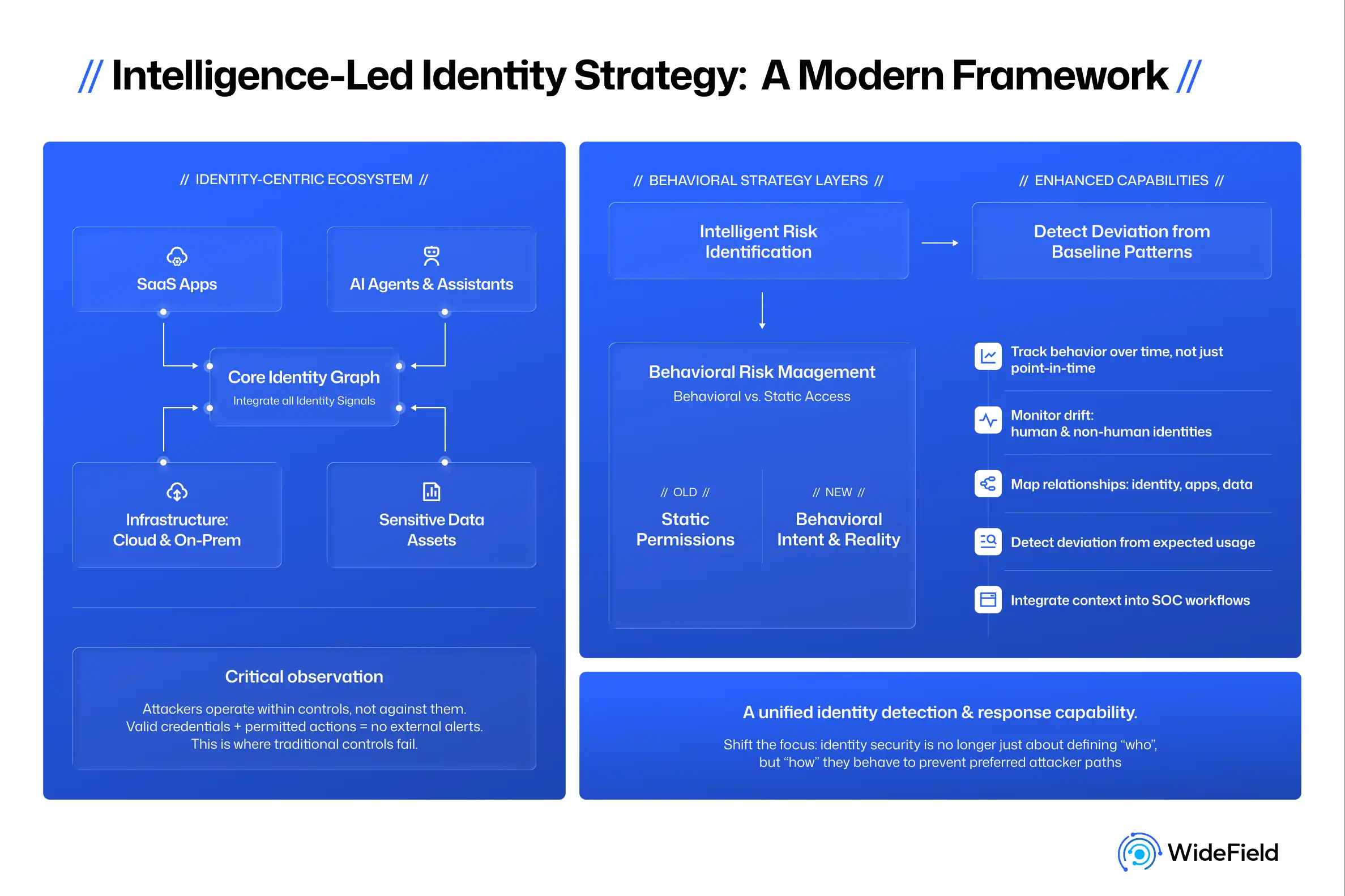
Organizations must shift toward identity detection and response (ITDR) to catch these autonomous agents. Modern era ITDR solutions move beyond the device to monitor the entire identity fabric of an enterprise.
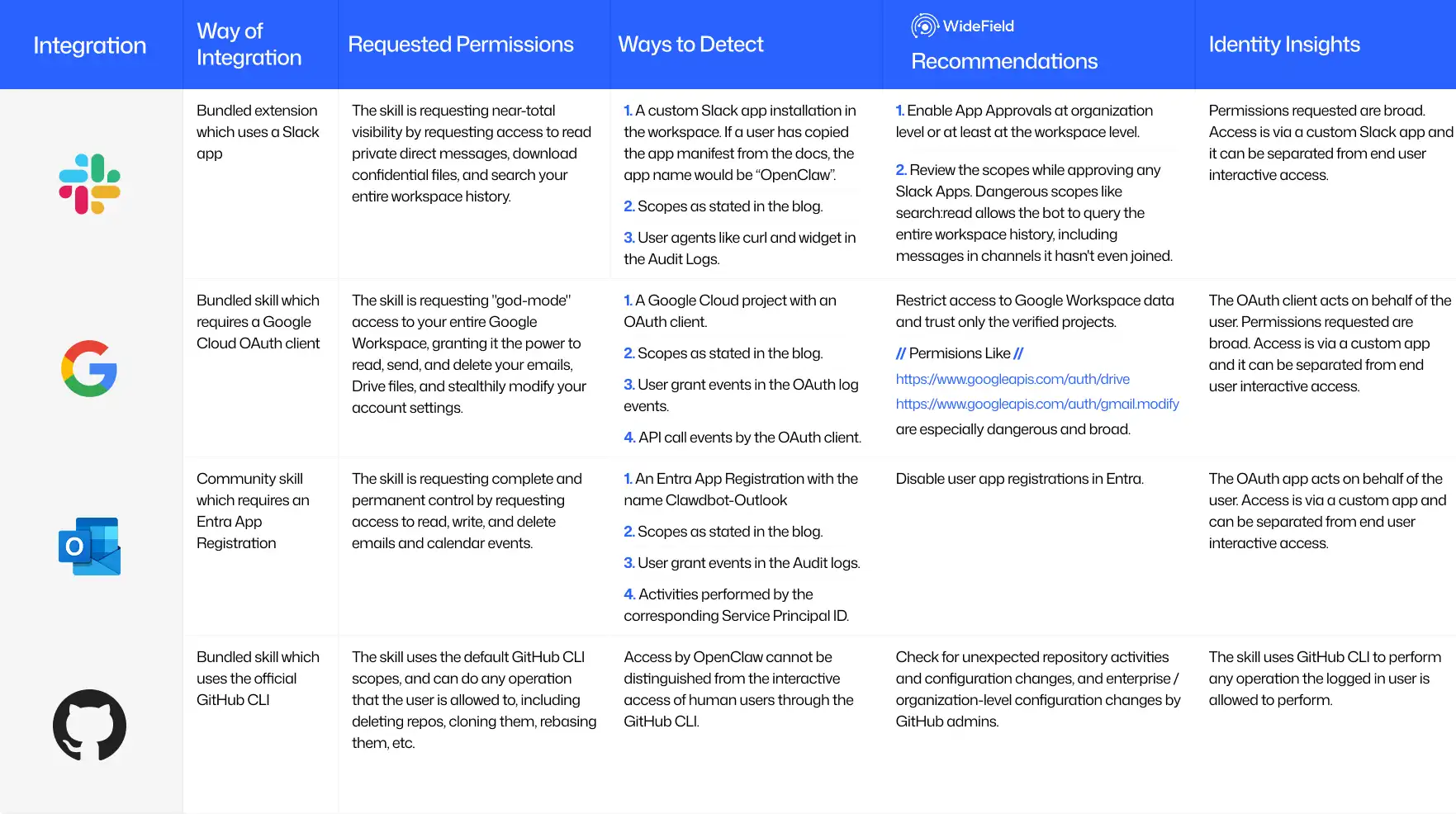
Here is a summary graphic of selection of enterprise applications to illustrate key detection points.




Santa Clara, CA 95051